AI TOOL / #01242
Photo Stitching (PixPix)
Combine multiple images into a long image grid
Introduction
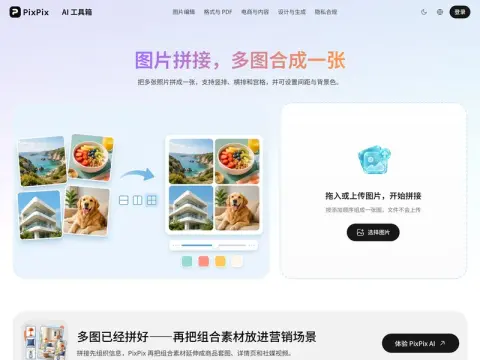
Combine multiple images into one and output it as a JPG, with three layout options:
- Vertical typesetting— Read the long image and tutorial from top to bottom.
- Horizontal typesetting— Before-and-after comparison, with A/B options presented side by side
- grid—— When displaying multiple similar photos, they look neatest when they are all the same size.
Setting the spacing to 0 creates a seamless stitch, which works well for joining long screenshots together; increasing the spacing makes each image stand on its own. Both the gaps and blank areas are filled with the background color, and these two settings largely determine whether the finished result looks like a polished piece or a casual mashup.
If the photo sizes don’t match, the grid will leave gaps that are filled with the background color. For the neatest result, first crop the photos to the same aspect ratio before stitching them together.
Related
Earnings Bot, GPT4-Vision GPT4-128K – Sidebar
An application designed for creating custom chatbots and generating charts using AI models.
BankStatementConverterAI
Use AI and OCR technologies to convert bank statement PDF files and images into Excel/CSV format.
AI TranslateDocs
AI Document Translation offers AI-powered document translation services in over 130 languages while preserving the original layout.
Nanonets
An AI-driven platform for intelligent document processing and workflow automation.
Solvr
Solvr is a free Chrome extension that provides instant AI-powered answers right inside the browser.
Free Accounting Software by SlickPie
Free online accounting software designed for small businesses and freelancers.