AI TOOL / #04050
AI Roundtable
Ask a question and receive answers from multiple AI assistants.
Introduction
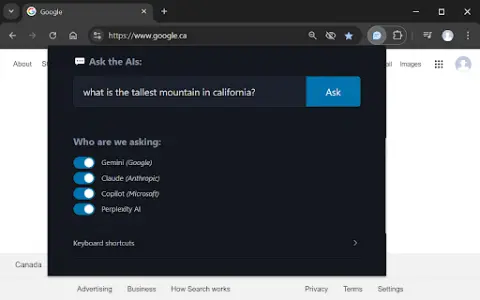
Ask one question, get answers from multiple AI assistants.
What is a Multiple AI Assistants Chrome extension/plug-in?
This website allows users to submit questions at once and receive answers from multiple AI assistants. Users can customize which assistant they want to use for their queries. The website also provides keyboard shortcuts, making it easy to access various functions quickly.
How to use the Multiple AI Assistants Chrome extension?
Use the shortcut keys Ctrl/Cmd + Shift + Q to open the query window and start typing your question. Use Alt + 1 to switch to Gemini, Alt + 2 to switch to Claude, Alt + 3 to switch to Copilot, and Alt + 4 to switch to ChatGPT.
The core functions of various AI Assistant extensions/plugins for Chrome.
Query multiple AI assistants simultaneously
It is possible to customize the selection of AI assistants.
Convenient and fast keyboard shortcuts
Related
Drive Guardian AI | Dash Cam
An intelligent dashcam application with AI capabilities, offering both recording functions and cloud-based parking management options.
Homes Like This
A visual search engine designed to help find properties that are visually similar to those currently on the market for sale.
ImagenATexto
Online tools can convert images into text and support a variety of formats and languages.
Conversease
An AI chat platform interface designed for seamless interaction with OpenAI and Mistral models.
Camocopy
Privacy-centered AI assistants and search engines comply with GDPR standards.
Photes.io
The AI note-taking assistant is capable of converting photos, PDF files, audio recordings, and videos into organized text notes.