AI TOOL / #04208
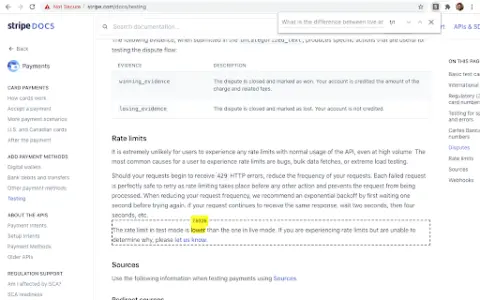
Shift-Ctrl-F: Semantic Search for the Browser
A Chrome extension that uses MobileBERT to search for and highlight answers on web pages.
Introduction
Chrome extension using MobileBERT to search and highlight answers on webpages.
What is the Shift-Ctrl-F Chrome extension/plugin?
Shift-Ctrl-F is a Chrome extension that utilizes the MobileBERT model, which has been fine-tuned using the SQuAD dataset. This extension uses TensorFlowJS to search for answers on web pages and identify relevant elements. It allows users to enter natural-language queries and find corresponding answers within the content of the current page.
How to use the Shift-Ctrl-F Chrome extension/plugin?
1) Open the extension pop-up window using the toolbar or shortcut key (Shift-Ctrl-F).
2) Enter your natural language query in the search box.
3) Press Enter and wait for the model to return the results.
The core functionality of the Shift-Ctrl-F Chrome extension/plug-in.
Conduct natural language question-and-answer interactions on web pages.
Highlight relevant elements based on the search query.
Efficient processing using MobileBERT
Related
Get AI Courses
A list of AI courses and certifications offered by top universities.
WisdomPlan
An artificial intelligence-driven learning platform that offers personalized learning plans and community support, designed specifically to assist adult learners.
elementsofai.de
Free online courses allow you to learn the basics of AI without the need for any mathematical or programming skills.
CourseMind
CourseMind is an AI-powered application designed to enhance the online learning experience for educators and learners alike.
Achievable – AI adaptive learning
Achievable is an online exam preparation platform that offers personalized learning and interactive courses.
Social Wizard: Level Up Skills
Master social skills and improve conversations with AI-powered tools.