AI TOOL / #06135
Ask Screenshot for ChatGPT
Improve ChatGPT productivity by analyzing screenshots and selected text.
Introduction
Enhances ChatGPT productivity by analyzing screenshots and selected text.
What is the Ask Screenshot AI Chrome extension/plugin?
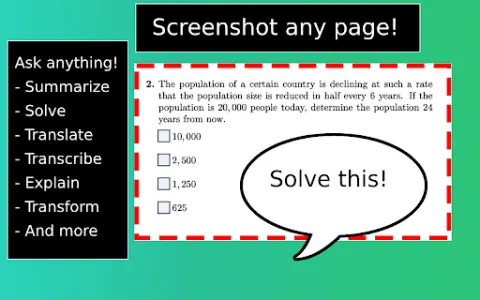
Ask Screenshot is a tool designed to improve productivity in ChatGPT, allowing users to analyze screenshots or selected text directly within ChatGPT. It offers features such as summarization, transcription, and translation, making it easier to extract information and process content from visual and textual sources.
How do I use the Ask Screenshot AI Chrome extension/plugin?
To use Ask Screenshot, right-click anywhere on any page and hover over Ask GPT to access the available screenshot templates. For selected text, right-click the selected text and hover over Ask GPT to view the available templates.
Core features of the Ask Screenshot AI Chrome extension/plugin
Screenshot and analyze: Take a screenshot and automatically open it in ChatGPT for analysis.
Text selection and analysis: Right-click any selected text to automatically open it in ChatGPT.
Related
BetterStudy
StudyBetter is an AI-powered learning platform designed for taking notes, creating summaries, and tracking progress.
AI Math Calculator & Problem Solver
A math AI solver based on GPT that can solve mathematical problems, including those depicted in images.
Reinforz
An artificial intelligence-driven platform that automates the academic tasks of educators and learners.
Cram Wizard
An AI-based learning platform that utilizes research-backed strategies to enable efficient learning.
AI addition learning helper
AI Addition Learning Assistant – provides interactive charts and printable addition tables.
Tutopa
An education platform powered by artificial intelligence that offers personalized guidance and tracking of students' progress.