AI TOOL / #07222
ReadImage
Extract, edit, and copy text from images on web pages.
Introduction
Extracts, edits, and copies text from images on web pages.
What is Image Text Extractor ai chrome extension/plugin?
This extension allows users to extract text from images displayed on web pages. It supports common image formats such as jpg, jpeg, png and bmp. After extraction, the text can be edited and copied.
How to use Image Text Extractor ai chrome extension/plugin?
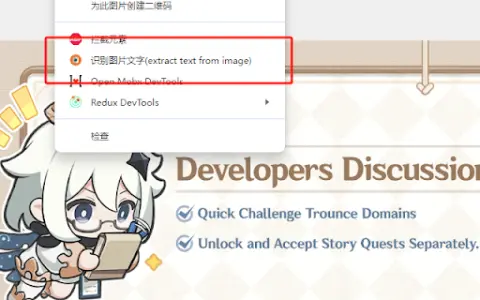
Hover your mouse over the image, right-click and select "Extract text from image". Press "Ctrl + Q" to view the extracted text on the extension page, where it can be edited and copied.
Image Text Extractor ai chrome extension/plugin core features
Extract text from images on web pages
Edit extracted text
Copy extracted text
Related
Innovatiana
Ethical data annotation outsourcing services focused on quality and impact.
PowerSpect
An AI-based platform for automated inspection and predictive maintenance of transmission towers.
Search by image on Amazon
A browser extension that allows users to search for products on Amazon by using images.
AI Math Solver
An AI-based mathematical solver that provides step-by-step solutions and image recognition capabilities.
Ultralytics
Ultralytics provides visual artificial intelligence tools and platforms for creating, training, and deploying machine learning models.
CrossPrism Nature
A mobile app that uses artificial intelligence to identify plants, fungi and animals offline.