AI TOOL / #07462
Vision AI
A Chrome extension that enables AI-driven insights based on screenshot data.
Introduction
Chrome extension for AI-powered insights from screenshots.
What is a Vision AI Chrome extension/plug-in?
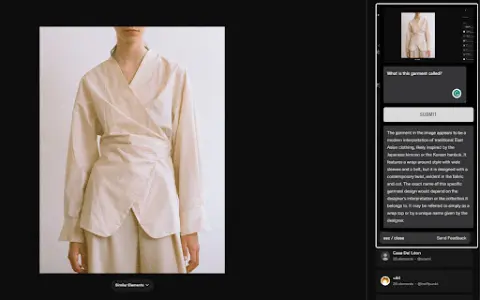
Visual AI is a Chrome extension that combines screenshot functionality with AI-driven insights to enhance online information search. It allows users to capture any portion of a web page, add notes or questions, and receive AI-generated responses based on the context of the captured image.
How to use the Vision AI Chrome extension/plug-in?
Install the Visual AI Chrome extension. Use CTRL + SHIFT + Y to take a screenshot, and then add any notes or questions you have. Visual AI will analyze the screenshot and provide an AI-generated response.
The core functions of the Vision AI Chrome extension/plugin
Screenshot capture
Interactive AI Suggestions
Seamless browser integration
Suitable for a wide range of applications in various fields
Privacy and Security
Related
EOS Data Analytics
Global provider of AI-driven satellite image analysis for various industries.
V5Vision.com Visual AI
AI-based visual search and recommendation platform for e-commerce and other industries.
AI Lens Image Search
An AI-powered image search Chrome extension that supports batch downloads and provides detailed information about images.
irisradgroup.com
AI-based automated road patrol and asset data collection solution.
monai.io
Open-source frameworks are used for the development and deployment of AI applications in the field of medical imaging.
Insect Identifier: Bug Finder
A mobile app for fast insect identification with detailed information and AI chatbot.