AI TOOL / #06235
Two Way Voice for Bard ™
Google Bard's voice interaction extension supports hands-free conversations and multi-language capabilities.
Introduction
Voice interaction extension for Google Bard, enabling hands-free conversations and multilingual support.
What is Google Bard Voice Extension ai chrome extension/plugin?
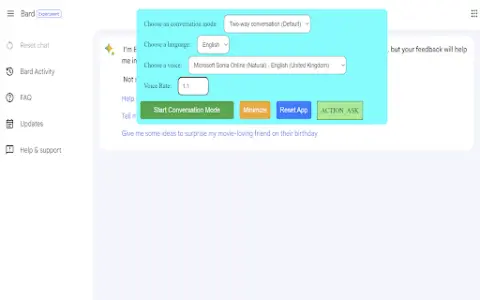
This extension is for the Bard website and allows users to interact with Google Bard via voice. It supports voice questions and answers, providing a hands-free and convenient way to obtain information, discuss ideas and explore topics. The extension supports multiple conversation modes, including two-way voice interaction, voice input text reply, and text input voice reply. It also supports voice questions in multiple languages such as Chinese and Korean.
How to use Google Bard Voice Extension ai chrome extension/plugin?
After installing the extension, simply activate conversation mode in the Bard website. The extension automatically manages the turns between questions and responses. There are three conversation modes to choose from: two-way speech, voice input text reply, or text input voice reply.
Google Bard Voice Extension ai chrome extension/plugin core functionality
Voice-based questions and answers
Multiple conversation modes
Multi-language support (e.g. Chinese, Korean)
Automatic turn management in conversation mode
Related
Flim
An engine that provides creative professionals with the ability to search for images and video screenshots.
Skin Cancer Image Search
A Chrome extension that compares images of moles with a database of skin cancer cases.
EyeGestures
Open-source webcam-based gaze tracking for accessible interfaces and eye-tracking research.
CoinGPT
A free app that identifies and appraises coins, stamps, banknotes, and antiques from photos.
stylitics.com
AI-powered platforms that offer inspiring business experiences.
ScreenScan – Instant Screenshot Search
Google Lens: Instantly capture, search, and explore images, videos, and text online.